This page updated 19 Apr 2013
Version note: Applies to Second Site 6 & 7
As described in my article on Sharing, I like to use what I call a "Minimalist" style for the "in progress" family history information I post on my public website. This article describes the methods I use to produce that style. Other articles in my Second Site Section cover other topics about customizing your site.
|
Topics Included in this Article |
|
| An overview of the intent and methods used | |
| Creating the bullet style listing of parents and events | |
| Creating brief source notes | |
| Adding a note to every person on the site | |
| Some useful options to consider | |
| Specifying the format for the list of children | |
| Providing links when people appear in more than one site | |
| Adding page titles and links to the index pages | |
My whole objective for the "in progress" part of my website is to encourage correspondence with other researchers. To that end I only provide basic facts about each person: name, parents, birth, baptism, marriage, death, and children. For each event, I show only date and place, with no other details. I show only basic source information and invite readers to correspond with me to obtain further details.
I have previously omitted source information altogether, on the theory that I wanted to encourage those who care about sources to contact me. But I've been convinced that complete absence of citations may discourage some serious researchers from initiating contact because they assume the work is unsupported. So I now provide limited source information, using the bibliography format. This format eliminates the citation details, so when the same source is cited for several events for a person, only a single source note is produced even if the citation details differ. This method of displaying sources produces less cluttered pages, and leaves more detail to be provided to those readers who make contact.
While I really like Second Site's standard Narrative format, which is designed to produce full narrative text in the style of TMG's Journal reports, for "finished" pages to share with family, I don't think it works all that well for this purpose. The briefer layout of the Gird, Column, and Bullet formats come closer to what I'm seeking. But the standard options still don't quite do what I want. For example, I find the use of normal sentence structures produce overly wordy output. But the "raw data" option uses only the tag labels to identify output from each tag, obscuring my first, second, and third marriage information.
The Bullets Unlabeled format is just what I seek. It produces no labels for the event tags, allowing the Sentence to control the way each tag appears. I didn't want regular sentences, so I created a custom Language in TMG, with custom Sentence Structures, to produce exactly the type of bullet labels I wanted for each tag type.
I prefer a Journal style list of children instead of a Family Group Sheet style "family" section, which I was able to achieve with settings in the Family Sections item in the Pages < Person Entry section. I used the "Literal - Person Bottom" item to add a note box after every person urging readers to contact me for more information. I did create some custom scripts to get the indexes to appear exactly as I wanted them.
You can view the result in my Outline Family History pages.
All these steps are described in the following sections. You can achieve almost all of what I did with standard options in TMG and Second Site. Only a couple of my changes require dealing with more esoteric subjects as script languages. If you like my approach, you can apply as many of these ideas as you find appealing, worthwhile, and within your comfort zone.
The most significant feature of my Minimalist style pages is listing the events in a simple bullet list. Most of this could be achieved by choosing the Bullet Format. Many users will find this Format and the available options provide entirely satisfactory results. But it uses the Label text from the Tag Type Definitions in TMG as the basis for the label for each bullet item, which makes it difficult to get a neatly labeled display of first, second, and third marriages when they are recorded as Roles, which is the method I use (see my article on Using Roles to Manage Multiple Marriages).
The Bullets Unlabeled format provides the perfect solution for me. The Format is selected in the Pages > Person Entry section. Since this format does not label the tags I can use the tag Sentences to provide the labels. I used Sentences created in a custom Language in TMG to create just the labels I wanted. See my article on Creating a Custom Language for details of how to do that. Since my "Minimalist" style uses only a few Tag Types, creating custom Sentences for them was simple task.
The Tag Type to be included are specified in the Data > Database section, in the Tags window. I include only the following types of tags:
|
Standard Tag Types |
Custom Tag Types |
||
|
Tag Type |
Use |
||
| Baptism Birth Christning Death Marriage |
Marriage Again | For the same couple married a second time | |
| Name-Farm | To record my Finnish ancestors' "farm names" | ||
| Name-Surname | To record adoption of a surname by persons who did not use them at birth | ||
| Webnote | To document questionable data about a person; see my notes on this Tag Type | ||
I wanted to include sources, but not in great detail, and I didn't want the long list of citations I'd get if I used traditional source notes. Because I use extensive entries in the Citation Details, most often the same source cited for several tags would produce a separate source citation for each tag. I dealt with these concerns by using the Bibliography format for citations. In the Data > Sources section of Second Site, I checked Show Citations, selected Bibliography for the Citation Sentence, and unchecked Show Sources. This omitted the Source Page so I unchecked the option in the Data > Sources section to "Show Citation Source Numbers" so that TMG's source numbers do not appear at the front of the citations. I think this makes the citations on the Person pages much cleaner in appearance.
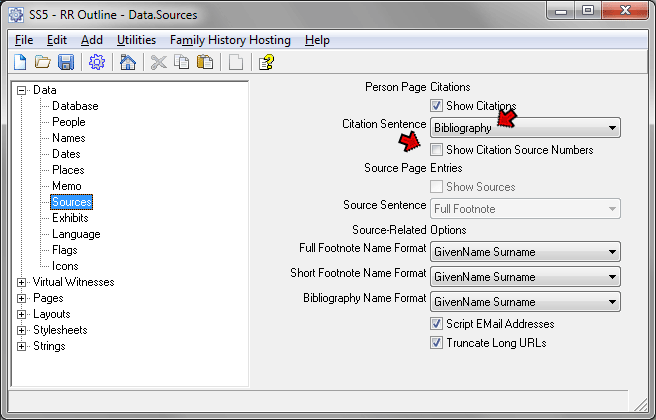
Since the Bibliography output template in TMG doesn't use the [CD] source element, no citation details appear in my webpages. Since every citation to a given source is then identical, each source appears only once for each person. Readers who would like to see the citation details are invited by a note to contact me.
Some of my bibliography entries included either e-mail or regular mail addresses of correspondents, which I didn't want to display on public webpages. I reviewed all the bibliography outputs and modified the Output Templates to remove these elements. The List of Sources report in TMG, set to bibliography output and sorted by source number, was helpful in making this review.
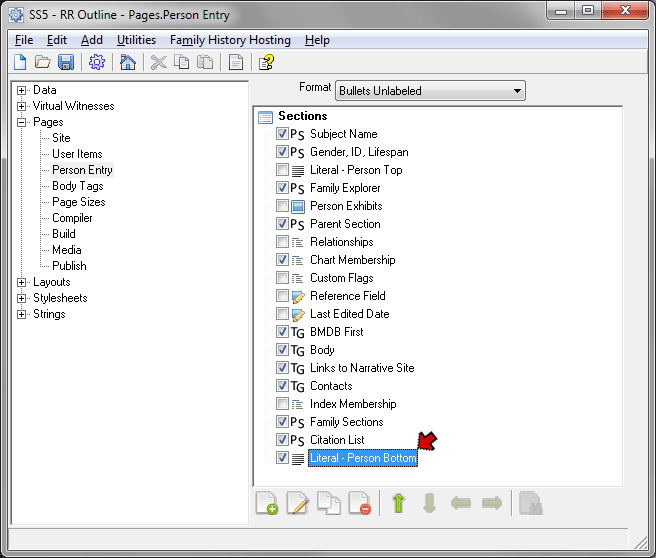
I include on my title page a description of the people included in my site and the limited types of information included about them, adding that I have much more available upon inquiry. I invite interested readers to contact me for details. I think this works well for readers who enter the site through my virtual "front door." But it appears many readers find a name of interest with a search engine, and are directed to a specific person page, bypassing my introductory material. To better address them, I wanted to place abbreviated versions of that note after each person's listing. This is easily done by entering the desired text in the Literal - Person Bottom item in the Pages > Person Entry section.
My project contains a lot of people (over 18,000) and includes some lines that are really doubtful (is my wife really descended from Charlemagne?), so I want to include only those that I'm reasonably confident about, and those I question but actually want input from others about. So I limit the people included by use of a Flag.
Still, that leaves a potentially large number of people, and since I specify one person per page (in order to match my detailed "Narrative" site, see the Coordinating Sites section below), potentially a huge number of pages. I have found that I can have the names of a large number of people appear in the site but substantially reduce the number of pages by excluding 1) children for whom I do not have children, or have only living children and 2) spouses for whom I do not have parents. I then specify that the names of Excluded Deceased people can appear as spouse and children, using the settings shown below:
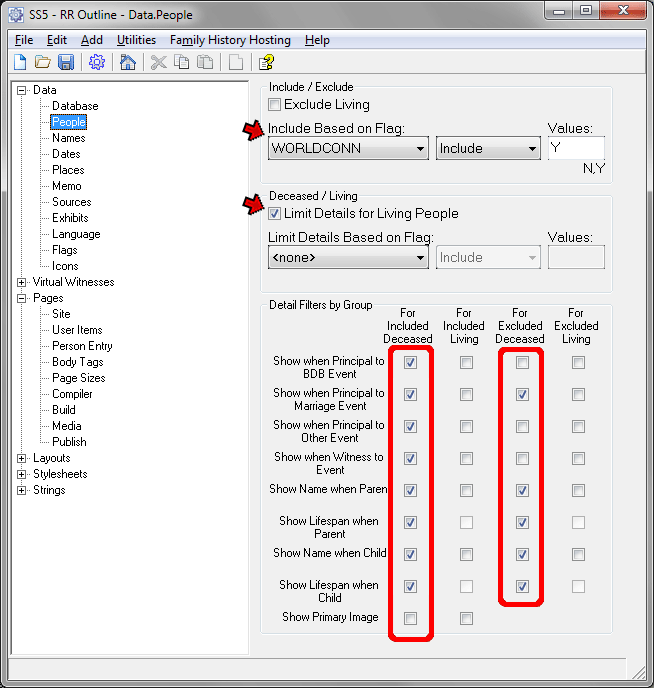
Here I have specified that only people who have my WorldConn Flag set to Y will actually be included in the site. That is, only they will have person pages and appear in the site indexes. I then specified that details be limited for living people. In the Detail Filters section I checked all the boxes under "For Included Deceased" (except for Primary Image - I don't want them on this site). I left all the boxes under "For Included Living" and "For Excluded Living" unchecked, because I do not want anything to appear for living people. But I did check several boxes under "For Excluded Deceased." This means that the names of those excluded spouses and children will still appear on the site as spouses and children, and can be found by search engines.
For more on controlling who is included in your site, see my Controlling Who is Included article.
A number of other options in addition to those mentioned above contribute to the overall impression of the pages, or produce specific features of my website. I'll list here those I think are the most significant, by the section in which they appear in Second Site:
Data > Memo – I don't want tag most Memos to be displayed in my minimalist style pages, so I set "Add Memo to Sentence" to "Do Not Append" (I could include the <[M0]> variable in the sentences of all the tags I use instead.) I leave "Suppress Memo" unchecked so the memo of my WebNote tag will appear.
Pages > User Items – since the indexes appear in the left pane of the side-by-side layout I prefer, I don't want to have links for them on the pages that appear in the right side pane. So I leave the boxes in front of the Surname Index and Master Index unchecked.
Pages > Page Size – check "Static Page Assignments." This keeps people from moving from one page to another as you update the site from time to time, which is helpful if your site is to be indexed by search engines or bookmarked by readers. Otherwise, these indexes will refer to the wrong pages for a few days, maybe longer, after you post updated pages, and user bookmarks will take them to the wrong page. I set the People per Page at 1 so this site coordinates with my Narrative site and I can create cross-references between the two sections. If it weren't for that I would use a considerably higher number.
Stylesheets > Style – I like the Plain theme which allows me to then design much of the appearance of the site on my own. I then customized a variety of elements as described in my articles on Customizing with Styles and Customizing with User Styles (not all of the example there apply to my "minimalist site – many apply only to my "narrative" site).
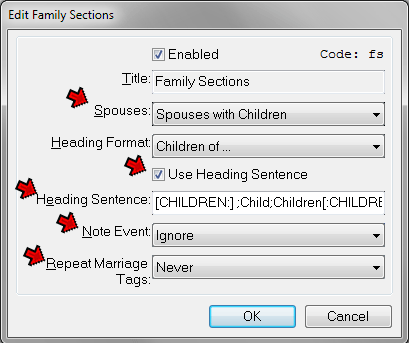
The approach I prefer for the list of children under each person is that used by TMG's Journal reports, which lists children the subject had with each spouse, and ignores spouses without children (I've already included them in the Marriage bullet items, and don't see a need to list them again.) This is easily achieved by use of the options available for the Family Sections item in the Pages > Person Entry section, as shown below:
Here I used the controls described below:
Spouses – selected "Spouses with Children" so that spouse without children appear only in the marriage event, and not again in the Family section.
Use Heading Sentence – is checked so that the Heading Sentence, below, is used.
Heading Sentence – entered the following sentence:
Since I have set the Spouses control to show only families with children, I've left the first segment of the [CHILDREN:]...[:CHILDREN] code empty. The other values produce "Child" or "Children" depending on whether there is one or more children listed. The balance of my sentence uses the standard TMG conditional format to produce "with an unknown spouse" if the other parent is not known, or "with" and the name of the other parent when known.
This section describes how to provide cross-reference links between two sites when they contain some of the same people. You can disregard it if you are not constructing multiple sites that include common people.
While my "Outline" site created with the techniques described in this article is designed to establish contact with other researchers during the research phase of my work, I find I want to share more complete details for lines in which my work is nearing completion. For that I use a very different type of site, as described in my article on Creating Virtual Sub-Sites. I call that my "Narrative" site. I don't want to remove the people who appear there from my Outline site, but do want to notify readers of my Outline site who come across one of them that much more information is available in the other site. To do that I create a cross-reference note in the Person Page entry of the Outline site for each person who appears in the other site.
That note includes a link that opens the Person Page for that person in the other site. Key to being able to create that link is to have each person on the same page number in both sites. That is automatically done so long as both sites have Static Page Assignments check, and the same number of People per Page, both set in the Pages > Page Sizes section. I have set my Narrative site to use one person per page both because of the very long narratives for some people, and because the "virtual sub-site" method I use there works best with that setting. As a result, I had to use that setting for my Outline site even though I might have preferred a larger number, and thus fewer pages, otherwise.
The next step was to create a Tag for each person who appears in both sites, which contains the text and link information. I originally did this with actual Tags entered in TMG, but creating them was tedious and error-prone. Flag Events offer a way to do the same thing by use of only a Flag, which I already had in use to select the people to be included in my Narrative site. Creation of Flag Events is described in my Flag Events article. To create a Flag Event for this purpose add a new event in the Data > Flags section as shown below:
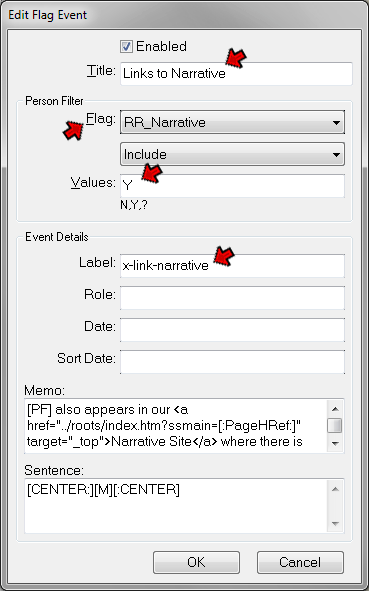
On the Edit Flag Event screen enter data in these fields:
Title – anything that describes this event; the Title is used only to identify this event in the list of events in the Data > Flags section.
Flag – select the Flag to be used, the Flag which controls who is included in the "other" site.
Values – enter the valued of the Flag used to include people in the "other" site.
Label – enter a Label for the event being created. The Label serves the same purpose as the Label in Tag Types in TMG, and is used to select the event for output in a Tag Group, which will control the formatting and positioning" of the note as described below. The Label should not be the same as the Label of any normal Tag in your Project.
Memo – enter the text of the note, including the HTML for link that is to be included in it. Details about that are described next.
The Memo text for the is constructed with a combination of plain text, TMG variables, HTML coding, and special Second Site scripts. If you are not using a Side-by-Side layout you would use a Sentence something like this:
[PF] also appears in our <a href="../roots/[:PageHRef:]">Narrative Site</a> where there is much more information about [OBJ]
This Sentence uses the following parts in addition to the plan text:
| [PF] | TMG variable for first name of subject |
| <a href="...">Narrative Site</a> | HTML code for a link: - the part inside the quotes is the address of the target page - the part between the > and < brackets is the text the reader will see as a link; change as you prefer |
| ../roots/... | The address of the target page the link goes to - the ../ part indicates that the target page is in a folder that is a peer of the current page - the roots part is the name of the folder containing the target page; change to your folder |
| [:PageHRef:] | Second Site script to generate the name of the Person Page containing the subject person |
| [OBJ] | TMG variable for objective pronoun – "he" or "she" |
Because I am using the Side-by-Side layout, which uses a frame with a smaller left side for the index pages and a larger right pane for all other pages I used the following more complex Sentence:
[PF] also appears in our <a href="../roots/index.htm?ssmain=[:PageHRef:]" target="_top">Narrative Site</a> where there is much more information about [OBJ]
It uses these parts:
| [PF] | TMG variable for first name of subject |
| <a href="...">Narrative Site</a> | HTML code for a link: - the part inside the quotes is the address of the target page - the part between the > and < brackets is the text the reader will see as a link |
| ../roots/index.htm | The address of the target page the link goes to - the ../ part indicates that the target page is in a folder that is a peer of the current page - the part between the two / slashes is the name of the folder containing the target page - index.htm is the name of the target page, in this case the target site's frame definition page |
| index.htm?ssmain=..." | The structure used with Second Site's Frame Script to specify which page to be loaded into the right side pane of the Side-by-Side frame |
| [:PageHRef:] | Second Site script to generate the name of the Person Page containing the subject person |
| target="_top" | Tells the reader's browser to discard the current frame and create a new page |
| [OBJ] | TMG variable for objective pronoun – "he" or "she" |
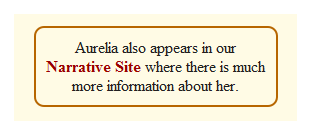
With the Flag Event created, next we consider how to display it within the Person Page entry. One could just allow it to be included with other Tags, perhaps using a sort date to position it. I thought it better to set it off in a box to make it more noticeable. That can be done by user of a Tag Group, as described in my article on Tag Groups. I used the same method explained for the Research Note example in that article. The result is a note like this:
I prefer links back to the Surname index at the top and bottom of the Person Index pages in the left pane of my side-by-side layout. And I want the page title – "Surname Index" or "Person Index" – to appear at the top of those pages. The standard scripts do not include these features. I achieved them by creating customized versions of three page scripts:
To add the page title to the Surname and Person Indexes, I created a custom Header script, which is selected in the Layouts > Surname Index and Layouts > Person Indexes sections.
These two changes are obviously not essential to this style of site and can easily be ignored by users not comfortable playing with such obscure issues as scripting languages.
There are lots of ways to structure your public webpages. How much detail you choose to include as well as your personal preferences should suggest the most appropriate Format. Hopefully, some of the ideas offered here will be helpful in creating a set of webpages that meet your needs.
| ReigelRidge Home | Terry's Tips Home | Contact Terry |
Copyright 2000- by Terry Reigel