This page updated 19 Apr 2013
Version note: Applies to Second Site 6 & 7
This article provides a few tips on some unusual issues that may arise as you use Second Site. Other articles in my Second Site Section cover the more normal topics of creating and customizing a site.
|
Topics Included in this Article
|
|
| Some issues if you use Split CDs in your citations | |
| Some considerations if you use Languages other than English(US) | |
| Creating similar sites in different languages | |
| Using sort options other than TMG's defaults | |
TMG users that have made use of "Split" Citation Details (CDs) need to be mindful of the implications when creating sites with source citations in Second Site. If you haven't used Split CDs in your TMG sources, you can ignore this section entirely.
Second Site offers a variety of tools to display the source information recorded in TMG in your webpages. By default, Second Site uses TMG's Short Footnote format on the pages displaying the details for individual people, with links to the full footnote. This works very nicely, but may cause problems if you use Split CDs to create your sources. In that case, the Full Footnote, being designed to include various parts of the CD at specified positions within the note, may not appear as it should because there is no specific CD for it to use. For those that encounter this situation, I see three possible solutions:
Modify your Sources – In TMG, make sure all CD segments in the Full Footnote Template are in conditional brackets, and adjust the wording, if required, so that the Full Footnotes read satisfactorily without the CD information.
Use the Bibliography Format – In the Data > Sources section in Second Site, you change the "Source Sentence" to the Bibliography, so it uses the Bibliography template. If you have important notes in the Comments section of the Source Definition, be sure that the [COMMENTS] element is included in the Bibliography Template.
Turn Off Separate Sources Pages – In the Data > Sources section in Second Site, change the "Citation Sentence" to "Full, then Short." This produces a Full Footnote for the first citation to a given source for each person, and then the Short Footnote for each additional citation for that person. Then, I uncheck the "Show Sources" box, since with Full Footnotes displayed for each person you don't really need the separate Sources Pages. One issue with this solution is that you cannot include Exhibits attached to Sources in your site.
Second Site, unlike TMG, does not have the capability to change the interface language. The Second Site screens are always in English. However Second Site does have a very capable set of features to produce websites in various "real" languages as well as custom "languages" developed by users for special purposes.
In Second Site, the language capability has two parts:
The words and phrases produced by Second Site itself as it generates your site. For example page labels, like "Master Index" or "Source Page," months of the year, and various pronouns.
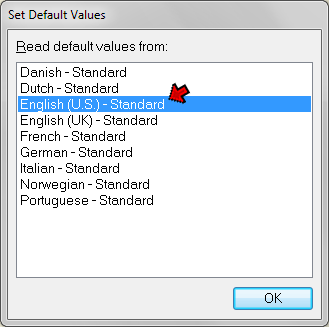
The first part, the words and phrases produced by Second Site, is controlled in part by the setting in the Site Language field in Data > Language section. But most phrases are controlled by the values entered in the Strings section, and default labels found in many other sections. The easiest way to set all these values to your desired language is to do so when you create a new site definition file (sdf). When you do so, you are prompted to select a language:
You always choose a "real" language here - English, French, German, etc., even if you are using a Sentences from a custom language. The language you select is used to set default values for many String fields, labels, etc. You can then edit specific fields later if you want to modify them.
The second part, controlling which set of Sentences to use, is done with the Sentence Language field in the Data > Language section:
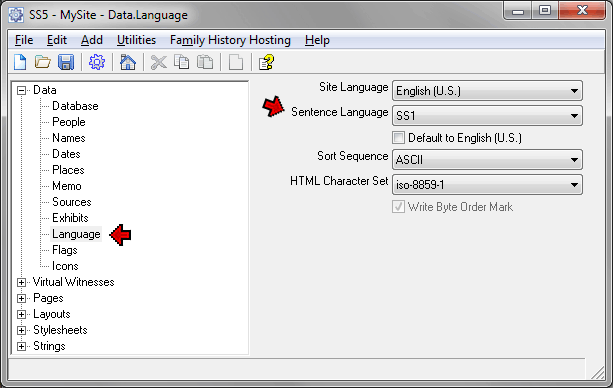
By default, the Sentence Language is set to the language you selected in the Set Default Values screen when you created the site definition file. For most users, that will be the appropriate choice. However, if you have created a custom language in TMG so that you could modify certain phrases, or to produce special output in Second Site, you would select that language for the Sentence Language. In the screenshot, the custom language "SS1" has been selected, as a user would do if that language had been created to customize Second Site output. See my article on Creating a Custom Language for a description of this usage.
Before you can use Sentences in a custom language in Second Site, that language, and the associated sentences, must be created in TMG. See my articles on TMG's Language Capability for details on how to do that.
The Site Language is set to the language selected in the Set Default Values screen, and generally should not be changed.
Some users may want to create a site in one language, then create a similar site in another language. For example, one might want to create a site in English for one's English-speaking family members, then create a similar site in German for the German-speaking part of the family. Trying to switch a site definition back and forth between two languages is problematic due to the large number of fields with language-sensitive contents. Perhaps the best method is to create separate "parallel" sets of site definitions for each language, using the following procedure:
Create a Site Definition in the first language. Make trial sites, adjusting options and settings, and editing the wording in the various fields, until you are satisfied with the resulting site.
Use the File > Save As menu command to make a second copy of the Site Definition for use with the second Language.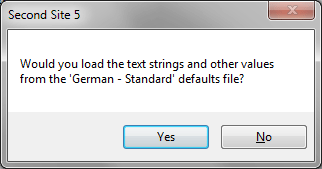
Change the Site Language in the Data > Language section to the new language. When you do the prompt at right appears asking if you want to change the text strings to those of your new language. Click Yes. Note that if you have customized any phrases in the Strings section those customizations may be over-written with phrases in the new language, so you may want to review them.
Generally you would also change the Sentence Language setting in the same section to match the new Site Language.
To obtain really satisfactory results with a site using Sentences, as is typically done with sites using the narrative format, and sometimes with others, the TMG Project will need to have Sentences in both Languages, and probably memo text in both as well. If you have them in only in one of the languages you end up with a rather unpleasant mix of languages on the "People" pages, as seen in the German version of my Sample site. For more discussion of issues with multiple languages in TMG, see my article on Multiple Languages.
Users of Languages other than English often set their "Collate sequence" to a special setting in order to properly sort names and terms containing characters not used in English. Users of English may also choose those settings if their data contains names with those characters.
There is a limitation in Second Site that causes an error if these settings are used in TMG while Second Site is generating the site. If you use a "Collate sequence" other than "General" or "Machine" in TMG, you must temporarily change it to one of these two while using Second Site. When you are finished creating your site, change it back to your normal setting. The change is made in TMG, in Preferences > Current Project Options > Other.
Within Second Site, the sort sequence is controlled by the setting in the "Sort Sequence" field in the Data > Language section (see screenshot above). Generally the correct sort sequence should be set by the Set Default Values screen when you create the site definition file.
| ReigelRidge Home | Terry's Tips Home | Contact Terry |
Copyright 2000- by Terry Reigel