This page updated 18 Apr 2014
Version note: Applies to TMG 8 & 9
Roles in TMG provide a way to create Tags to record events that include a number of participants in that event, and to easily have each participant's role in the event correctly reflected in narrative output. While complex constructs are possible for special applications, in this tutorial we'll stick to that basic idea.
| Topics Included in this Article | |
| What Can Roles Do? | Understanding what Roles do |
| An Overview | An overview of how Roles are used |
| TMG's Standard Roles | Some Roles are included in standard Tags |
| The Term "Witness" | "Witness" is sometimes confusing |
| Creating Custom Roles | How to create custom Roles |
| Defining Role Sentences | Creating Sentences for your custom Roles |
| Referring to Role Names | Using Role names to refer to other participants in Sentences |
| Applying Roles | Using the Roles you have created |
Access to Roles, Witnesses, and Sentences, which are all central to the subject of this article, are available only in Advanced Data Entry Mode. You can change between Beginner and Advanced mode in Preferences > Program Options > Data Entry.
This tutorial will use a simple case as an example – a Will tag to record the writing of a will, which will accommodate four different roles:
The idea is that we want to be able to create Will tags that records all of these participants, and correctly describes their roles when we create narrative reports about them.
Some of what we describe can be done without use of Roles, but requires customization of the Sentence Structures in each will Tag we create. Other uses cannot be duplicated without using Roles unless we are willing to type the names of each participant into the Memo field, a messy and error-prone method.
Roles provide two separate, but related functions:
When you use Roles, you might use either or both of these functions. But it is important to understand that they are separate, so we can apply them to achieve the results we expect.
Recall that Roles define participants in an event. TMG offers separate Tag Types to record different types of events, for example birth, marriage, death, writing of a will, military service, etc. Thus Roles are defined for each Tag Type. Each Tag Type can have different Roles, suited for recording that type of event. Thus it follows that before you can use Roles, you have to define them for the Tag Type in which you want to use them. You might do this for an existing Tag Type, to improve its functioning, or in a new custom Tag Type you create.
When you create Roles in a Tag Type, you define a default Sentence Structure for that Role. It defines how participants with the Role will be described in their narrative reports.
If you choose, you can modify the Sentence Structures of other Roles to refer to other participants by Role. This is not required, but can be a powerful tool in certain applications, as we will see later.
Once the Roles are defined, and you create individual Tags using them, the Roles must be applied to persons entered as Principals or as Witnesses in that Tag. You make this assignment for each Tag as you create it, or you might edit existing tags to change the Roles for participants already entered.
Whether the user notices or not, every person entered in TMG is assigned a Role in every Tag in which they are entered. By default, every person entered as a Principal in a Tag is assigned the Role "Principal," and every person entered as a Witness is assigned the Role "Witness."
Some standard Tags Types offer additional Roles. For example, the marriage tag offers the Roles of "Bride," "Groom," "Best Man," "Bridesmaid," "Father of the Bride," "Father of the Groom," "Judge," and many more. The standard Sentence for the Roles intended for the principal players in the event, who are generally entered as Principals in the Tag, are the same as the standard "Principal" Role for the Tag Type and offer little value. However the other Roles, which are generally intended for Witnesses, have Sentences that describe the role played by that person, and thus are quite useful.
None of the Sentences in standard Roles include references to other people entered in the Tag as Witnesses. So, if for example you want to include the names of the best man or minister in the narrative of the bride and groom, you will need to modify the Sentences for the Principals to add those references, as described in the "Using Role Names to Refer to Other Participants by Role" section below.
In this example, we use the term "witness" in two different ways. TMG uses the term "Witness" to describe any participant in an event. One or two of them are also called "Principals", and are entered in the upper left corner of the Tag Entry screen. Everyone else is called an "Other Witness," or more commonly, just a "Witness." The "Other Witnesses" are entered in the "Witness" area of the Tag Entry screen, outlined in red below:
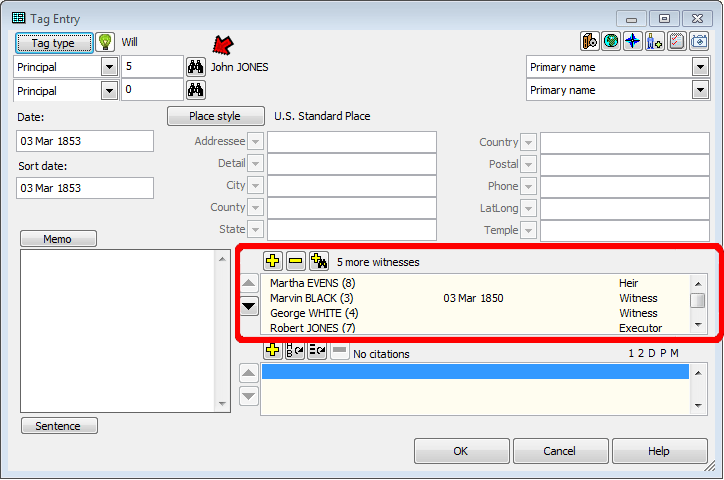
People entered as "Witnesses" may be witnesses in the ordinary sense, meaning they witnessed the event, like our witnesses to the signing of the will. But they may also be associated with the event in another way, like our executor or heirs. In the screenshot above we see four people entered as "Other Witnesses" in TMG terms, meaning they are not Principals (there is one Principal in this example, entered at the top left of the screen). Of the four visible Other Witnesses, one is assigned the Role of "Heir", two are assigned the Role of "Witness," meaning that they actually witnessed the signing of the will and the fourth is assigned the Role of "Executor." One more person (not visible on the screen) entered as Other Witnesses are assigned the Role of "Heir." Note the label "5 more witnesses" which tells us that 5 persons have been entered as Other Witnesses ("more" means in addition to the Principals).
To summarize, we must enter everyone but the Principals in the tag as "Other Witnesses," generally just called "Witnesses." But when we can then assign those "Other Witnesses" whatever Role we like. In this example, some are assigned the default Role "Witness" while others are assigned other Roles.
Let's get started with the details. Once we have decided that a Role would be useful for a particular Tag Type, we begin by editing that Tag Type to add the desired Role. Open the Master Tag Type list, from the Tools menu, and select the Tag Type you want to edit (we're assuming here that the Tag Type already exists; either it's a standard one, or it's a custom one we have already created). In this example, we are going to modify the standard Will tag:
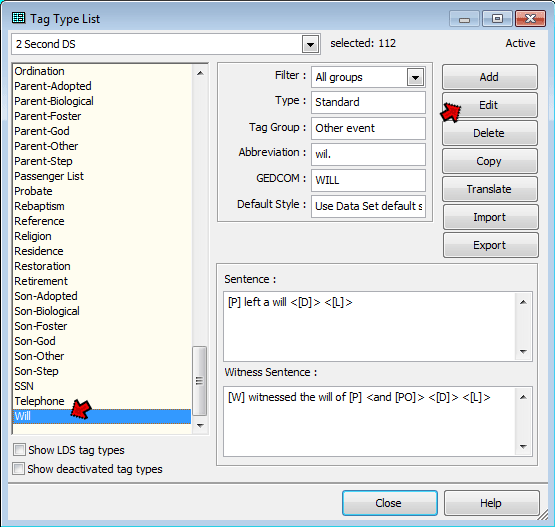
After selecting the Tag Type to be used, click the Edit button to open the Tag Type Definition Screen. On that screen, click the Roles and Sentences tab. In the list on the left side of the screen, you will see all the existing Roles in this Tag Type, in this case only the two default Roles, "Principal" and "Witness:"
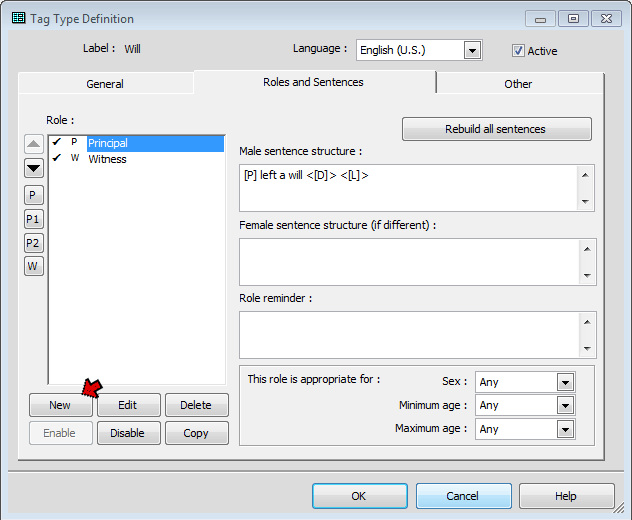
To add a new Role click the New button below the list of Roles. This opens the New Role screen, where we type in the name of our new Role.
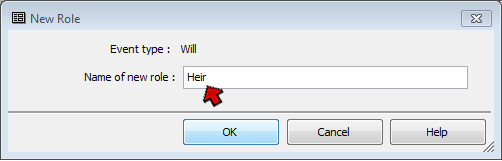
In this example we will add two custom Roles: Heir and Executor. We could create a custom Role for the Testator, but there is no need since the only principal in the Tag will be the person who wrote the will. I see no value in creating custom roles when the standard ones will serve just as well. Likewise, the standard Witness role will serve very well for the witnesses to the signing of the will.
Once the new Roles have been created we need to create appropriate sentence structures for them. This is done on the Roles and Sentences tab of the Tag Type Definition Screen. The same screen is used to edit the Sentences for standard Roles.
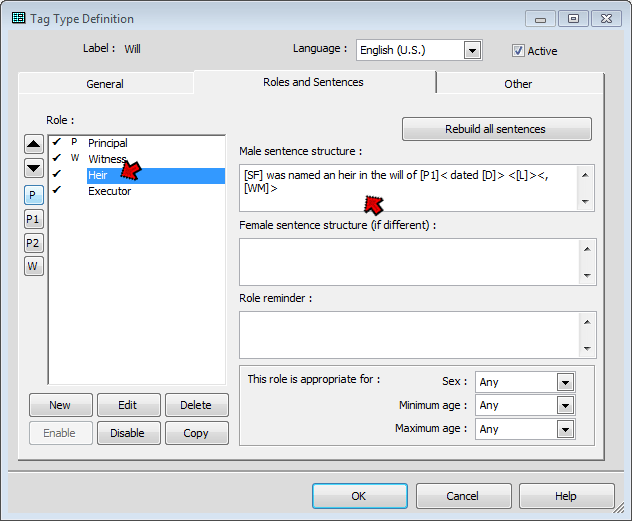
We select each Role we want to modify, and edit the Sentence Structure for that Role. Here we see the Sentence for the "Heir" role. A fuller description of Sentence Structures can be found in my article on Modifying Sentence Structures, but a one point specific to their use in Roles might be noted here.
One can use the Role name variables within the Sentences for a Role to refer to the participant with that Role. For example, we might use [RF:Heir] here instead of [SF] to refer to this heir. But doing that when more than one person is likely to be assigned that Role, as is the case with this Heir Role, means that the names of everyone with that Role will be listed in this heir's output, not just his or her name (in TMG 9.01 and prior, there were exceptions for certain Role Variables when used to refer to the subject of the Sentence). I recommend using "subject" Variables – [S], [SF], etc. – to refer to the person to whom the Role is assigned, at least for Roles that are to be used for Witnesses or to both Witnesses and Principals. For Roles that will be assigned only to Principals the "position" variables, such as [P], can be used. See my article on Sentence Variables for People for more information.
We would similarly create a Sentence for the "Executor" Role, perhaps:
[SF] was named an executor in the will of [P1]< dated [D]> <[L]><[M0]>
Since the term "executor" is gender specific, we might also create a female Sentence for it, something like:
[SF] was named an executrix in the will of [P1]< dated [D]> <[L]><[M0]>
We could modify the Sentences for the Principal (testator) and Witness Roles, but the default Sentences are really adequate.
These Sentences will be used in the narrative for each participant, to describe their participation. For example, if we create a narrative about the executor of this will, it might read:
Thomas was named an executor in the will of John Jones dated 3 Mar 1853.
If all we want to do is create text that properly describes the role of each participant in the event, our task is done. We can skip to applying the Roles we have defined. But we might want to use the more complex feature of using Roles to refer to participants to enhance the Sentence for the Principal, as described in the next section.
One of the very useful features of Roles is the ability to refer to other participants by role. We will apply this feature to enhance the narrative for testators by listing the witnesses, executor, and heirs to the narrative. We select the "Principal" Role, since that is the one we are using for the testator, and modify the the Sentence:
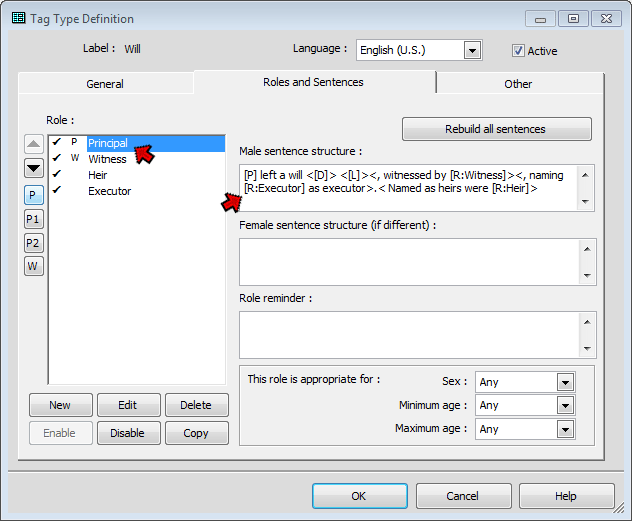
Note that the Role name variables are used to refer to each group of participants by role, with appropriate wording to identify them. The narrative produced by the Sentence illustrated here might be something like:
Some notes on the Role name variables used here:
| Variable | Function | Example |
| [R:rolename] | full name | Robert Lee Jones |
| [RF:rolename] | first name | Robert |
| [RG:rolename] | given name | Robert Lee |
There are a number of other variables available. To review them, see my lists of Sentence Variables, or search Help for "Variables," scroll to near the bottom of the list for "Variables (Event Tags)," and in that Help article, scroll three-quarters of the way to the bottom for the section on "Roles."
Once we have defined the Roles in the Tag Type, we are ready to apply them. We do this by editing an existing Tag of that type, or creating a new one. Open the Tag Entry screen, and enter each of the participants, assigning them each the appropriate Roles:
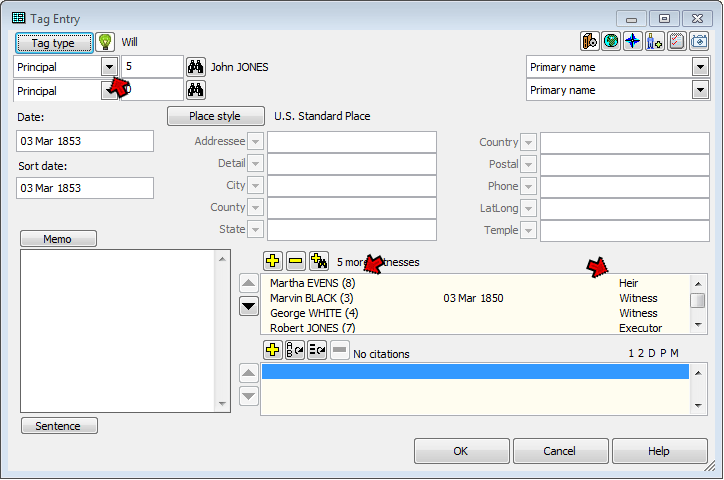
In this example, we enter the testator as Principal, and leave him with the default Role of "Principal." All the other participants are entered as Witnesses, and assigned their appropriate Roles. If we were to use a different Role for the Principal, we would chose that role from the drop-down list to the left of the ID number, just below the Tag Type button. For Witnesses, the Roles are assigned with the Roles drop-down in the Add Witness screen:
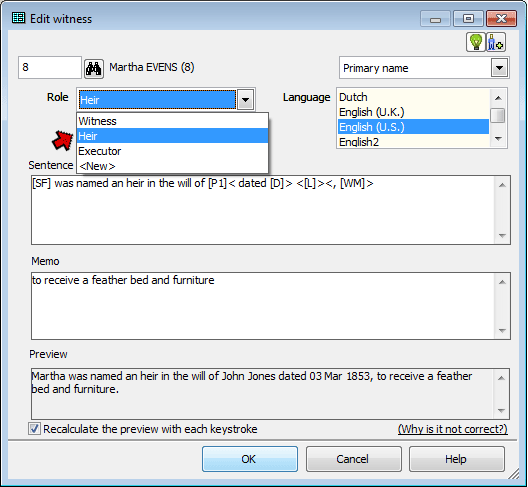
Assigning the Roles to each participant has two impacts – 1) it assigns the Role Sentence to that participant so that they are correctly described in their own narrative, and 2) it makes them available to be referenced by Role in the Sentences of other participants.
The discussion of Roles in this Tutorial is necessarily limited to some general concepts. For examples of other applications, including some that are much more complex, see the links at the bottom of my article on Using Roles.
| ReigelRidge Home | Terry's Tips Home | Contact Terry |
Copyright 2000- by Terry Reigel